English
 Deutsch
 Español
 Français
 Italiano
 日本語
日本語 Русский
 中文
中文
- Author
- 06 November 2025
Exploring the Best 3D Printing Settings for HIPS
A technical guide to mastering thermal control, bed adhesion, and solvent-based support removal for HIPS filament.
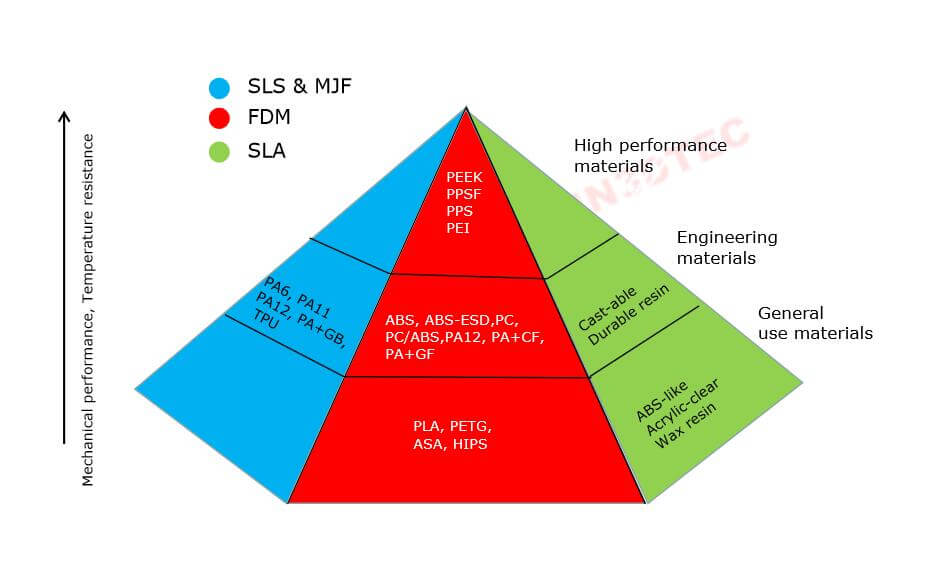
High Impact Polystyrene or HIPS is a standout choice in the world of 3D printing. Known for its strength, durability, and solvability in D-limonene, HIPS is frequently used both as a primary printing material and as a support structure for more complex prints. In this blog, we’ll explore the best 3D printing settings for HIPS to help you achieve optimal results.
1. WHY CHOOSE HIPS?
HIPS offers several advantages that make it a popular choice among 3D printing enthusiasts:
- Strength and Durability: HIPS produces strong and impact-resistant prints.
- Ease of Use: It’s relatively simple to print with HIPS compared to other filaments.
- Support Material: When used as a support material, it easily dissolves in D-limonene, providing clean, detailed prints without manual support removal.
2. OPTIMAL 3D PRINTING SETTINGS FOR HIPS
2.1 Critical Temperature Management
Nozzle Temperature: To achieve the best results with HIPS, a nozzle temperature between 230°C and 250°C is recommended. Starting at 240°C, you can gradually increase the temperature if you notice issues such as under-extrusion.
Bed Temperature: HIPS has a tendency to warp without a heated bed. Keeping the bed temperature between 90°C and 110°C is crucial for proper adhesion and minimizing warping.
2.2 Speed and Motion Control
Print Speed: A moderate print speed of 60 to 100 mm/s is ideal for maintaining structural integrity.
Retraction Settings: To minimize stringing and oozing, a retraction speed of 40 to 50 mm/s and a distance of 1 to 3 mm usually works best. Note: Settings may vary by extruder type; consult your equipment provider for specific values.
2.3 Bed Surface and Adhesion Aids
To improve adhesion and prevent warping, consider using:
Glass Surface: Apply a glue stick or hairspray for enhanced grip.
PEI Sheet: Offers excellent thermal stability for HIPS.
Brim or Raft: Using these aids can significantly reduce the chances of warping on larger prints.
3. ADVANCED ENVIRONMENT AND POST-PROCESSING
3.1 Cooling and Chamber Settings
Cooling Fans: HIPS prints better with minimal cooling. Turn the fan off or keep it at a very low setting to avoid layer separation.
Enclosed Chamber: Printing in an enclosed chamber helps maintain a stable temperature. A minimum ambient temperature of 50°C is recommended to prevent cracking.
3.2 Layer Height and Detail
For optimal results, select a layer height between 0.1 and 0.3 mm. Finer layers provide better detail but increase print time; adjust based on your specific needs.
4. TROUBLESHOOTING COMMON HIPS ISSUES
- Warping: Ensure adequate bed temperature and utilize an enclosed chamber.
- Layer Separation: Maintain a consistent ambient temperature; avoid drafts and cold spots.
- Under-Extrusion: Check nozzle temperature and ensure the filament is dry, as HIPS can absorb humidity over time.
FINAL THOUGHTS
HIPS is a versatile and reliable filament for both standalone and support prints. By carefully tuning the settings mentioned above, you can maximize the benefits of HIPS and produce high-quality, durable prints. Whether you’re a beginner or a seasoned 3D printing enthusiast, these settings can significantly enhance your experience.